

Multi Brands – Multi Outlets Setup: add brands and outlets without losing control
One head office, many brands, and many Sanguine POS outlets under each brand. Masters go out from the head office, and sales data and stock transfers come back in.
From one head office to every counter
Head office
Sanguine ERP at the head office holds the masters and the head office data on its web server.
Brands
Each brand sits under the head office.
Outlets
Every brand has its own outlets, each billing on Sanguine POS.
Sync
Masters flow down to outlets. Sales data and stock transfers in and out flow up to the head office.
Report
See MIS on mobile or laptop, and compare outlets on the POS multi outlet dashboard.
Brands with their own outlets
An illustration: each brand can run a different number of outlets.
Two directions, one source of truth
Control goes out
- Masters for every outlet
- Stock transfer out to outlets
Numbers come in
- Sales data from every POS
- Stock transfer in from outlets
- MIS on mobile and laptop
Compare every outlet, every brand
Month-wise, POS-wise, group-wise, subgroup-wise, menu-wise and operation-wise sale for any date range.
See F&B chain management →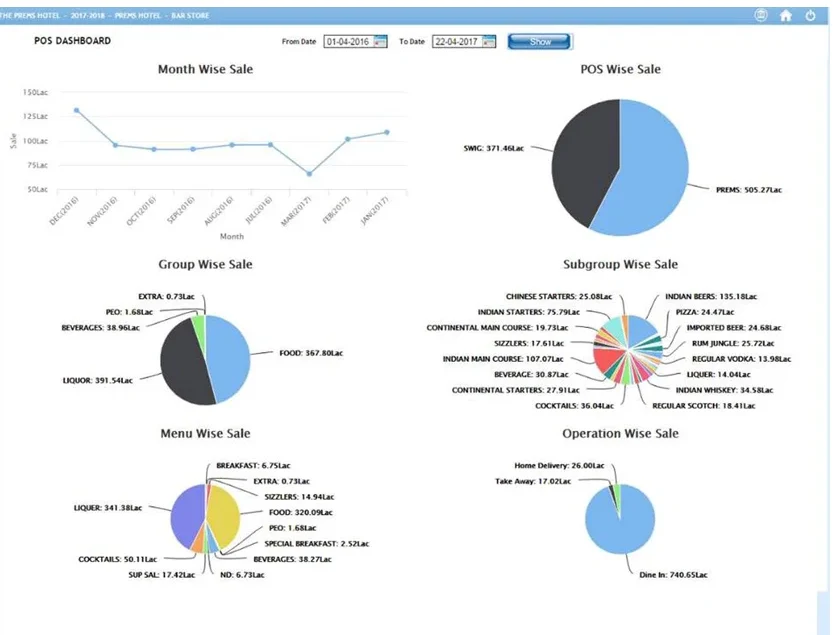
Multi Brands – Multi Outlets Setup: frequently asked questions
Can Sanguine run several brands from one head office?
Yes. In the multi brands, multi outlets setup, one head office manages several brands, and each brand has its own outlets running Sanguine POS.
What does the head office send to outlets?
The head office sends masters to the outlets.
What do outlets send to the head office?
Each outlet sends its sales data to the head office web server, and stock transfers in and out are recorded.
Where can owners see the numbers?
MIS from the head office can be seen on mobile and on a laptop, and the POS multi outlet dashboard compares every outlet.
Set up all your brands and outlets with Sanguine
Free demo and pricing for your outlet, in India or abroad.
Get a free demo & pricing
Tell us about your business and our team will call you back.
Sales: +91 98508 73037sachin@sanguinesoftwares.com