
F&B Chain Management: every brand, every outlet, one head office
Connect every Sanguine POS outlet across all your brands to one head office. Send masters out, bring sales data in, track stock transfers and see the MIS on your phone.
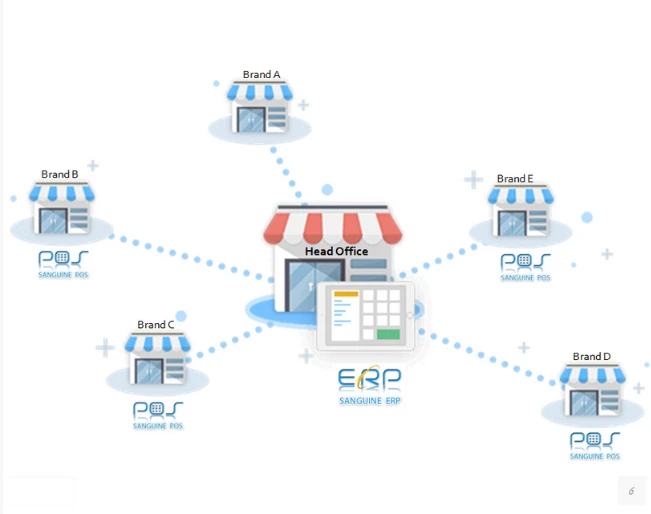
One head office at the top of the tree
How data moves between outlets and head office
Head office data in one web module
- Sales data
- Stock transfers
- Masters
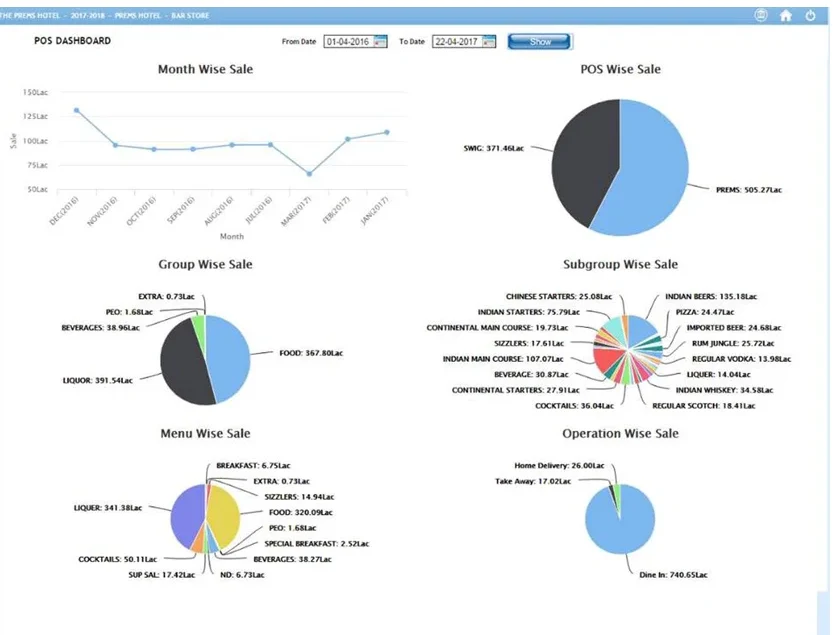
All outlets on one dashboard
Pick a date range and compare every outlet side by side.
F&B Chain Management: frequently asked questions
What is Sanguine F&B Chain Management?
It is a Sanguine ERP setup for food and beverage chains with multiple brands and multiple outlets, all connected to one head office.
How do outlets connect to the head office?
Each outlet's Sanguine POS sends sales data to the head office web server. The head office sends masters to the outlets, and stock transfers in and out are tracked.
Can I run several brands in one setup?
Yes. The head office manages several brands, and each brand can have its own outlets running Sanguine POS.
What reports does the multi outlet dashboard show?
Month-wise, POS-wise, group-wise, subgroup-wise, menu-wise and operation-wise sale (dine in, take away and home delivery).
Can I see the MIS on my phone?
Yes. MIS from the head office can be seen on mobile and on a laptop.
Bring all your brands under one head office
Free demo and pricing for your outlet, in India or abroad.
Get a free demo & pricing
Tell us about your business and our team will call you back.
Sales: +91 98508 73037sachin@sanguinesoftwares.com